Welcome to LBank Copy Trading! This instructions provides a detailed introduction on how to become an efficient copy trader. Easily follow the strategies of top lead traders and achieve steady asset growth. Whether you are a beginner or an experienced investor, copy trading helps you save time and effort, enabling you to capture market opportunities faster.
How to Choose a Lead Trader?
View Lead Trader List
-
Log in to LBank App and tap「Copy Trading」;
-
Tap「Top Lead traders」to view traders with excellent performance;
-
Tap「All Lead traders」to view all of the traders;
-
If there is a target trader to follow, tap「Search」directly.

-
When viewing「All Traders」, filters can be applied based on different conditions:
-
First condition:Tap「Overall ranking」and select to sort by「Overall ranking」,「PnL%」,「Win Rate」,「PnL」,「Copiers' Profit」,「AUM」or「Max drawdown」;
-
Second condition:If there is a specific requirement for the period, tap「30 Days」to select sorting by「180 Days」,「30 Days」,「14 Days」or「7 Days」.

-
Tap「Filter」icon to set precise filtering conditions:「Hide」,「Time Range」,「30D PnL%」,「30D PnL(USDT)」,「30D Win Rate」and「Lead Trading Pairs」.
-
Tap「Lead Trading Pairs」to search and select as needed;
-
Once settings are complete, tap「Confirm」to view traders that meet the conditions.

View Trading Details
-
Tap on the lead trader's card to enter「Lead Trader Profile」;
-
Tap「Overview」to view data such as「Copy Trading PnL」,「Performace」,「Holding Duration」;

-
Tap「Lead orders」to search and view by「Symbol」;
-
Tap「Summary」to view the current trader summary;
-
Tap「Details」to view the order time and order number details of the current lead trader.

-
Tap「Order History」to search and view by「Symbol」and「Close time」;

-
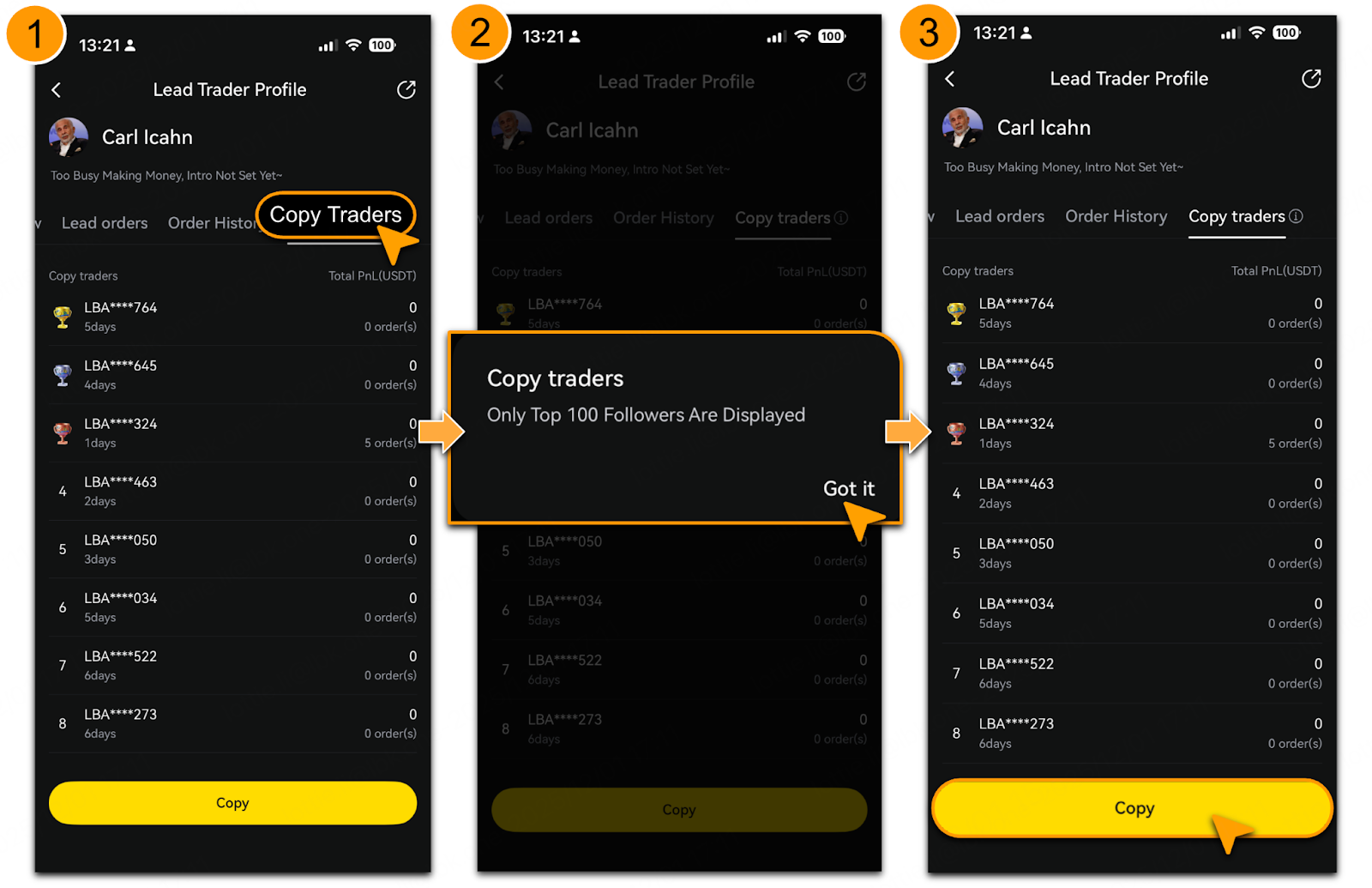
Tap「Copy Traders」to view follower data, displaying only top 100 followers(copy traders).
-
After selecting the lead trader to follow, tap「Copy」.
When A Trader Shows No Quota to Follow
-
Tap「Full」>「Start」to set slot notification;
-
To cancel, tap「Waiting」 > 「Confirm」.

Set Copy Trading Parameters
「Customize Later」
-
Tap「Copy」to choose「Customize Later」;
-
Choose one of the following modes:「Fixed margin」,「Fixed Multiplier」or「Smart ratio」:
-
In「Fixed Margin」mode, enter「Margin per Order] as prompted;
-
In「Fixed Multiplier」mode, enter「Multiple per Order」as prompted;
-
In「Smart Ratio」mode, the system automatically sets the ratio based on the trader's margin to balance ratio for opening trades.
-
After setting and confirming the parameters, tap「Start Copying Now」.

「Copy」
-
Tap「Copy」to choose「Copy」, the settings will be automatically configured based on the trader's recommended copy trading parameters.
-
After setting and confirming the parameters, tap「Start Copying Now」.
📌For details, refer to「LBank Copy Trading: One-Click For Easy Start」

「Advanced Settings」
-
Tap「Advanced Settings」to configure the following parameters:
-
「Maximum Follow」: Choose「Cumulative Amount」or「Per Futures」and enter the maximum follow amount;
-
「Single Take Profit」and「Single Stop Loss」: Set either「By PnL%」or「By PnL(USDT)」;

-
「Copy trading stop-loss」: Enter the maximum acceptable loss amount to choose「Follow Lead trader to close」or「Market close」;

-
「Trader Liquidated」: Choose「Follow position Liquidation」or「Do not follow position Liquidation」;
-
「Copy Trading Futures Settings」:By default, "Follow Trader" is selected for all contracts. Alternatively, select「Custom」to manually choose copy trading contracts on the details page.
📌For parameter setup, please refer to「Risk Control for Copy Trading」;

-
After setting and confirming the parameters, tap「Start Copying Now」.
-
Tap「Copy Trading Details」to view the specific copy trading information.

View「My Copy Trading」
-
On the copy trading page, tap「My >」;
-
Tap「Overview」to view「Copy Trading Performance」and「My lead traders」;
-
Tap「Lead Traders」to view the details of the traders in「Current Follow」and「Historical Follow」.

-
Tap「Current Orders」to search and view by「Symbol」and「Lead Trader」;

-
Tap「Order History」to search and view by「Symbol」and「Lead Trader」;

Adjust Settings After Copy Trading
Edit Settings
-
On the「My copy Trades」page, tap「My >」;
-
Tap「Lead Traders」>「Current following」to select the corresponding trader, tap「>」;
-
Tap「Edit」;

-
After setting the parameters to be modified, tap「Save edit」>「Save」.
📌For parameter descriptions, please refer to LBank Copy Trading Guide: Optimized Settings and Tips」.

Cancellation
-
On the「My copy trades」page, tap「Lead Traders」>「Current following」;
-
Tap on any specific Lead Trader’s information card, if cancel is needed;
-
Tap「Unfollow」icon;
-
Tap「Confirm」to complete.

Risk Disclosure
Copy trading involves significant risks and may result in partial or complete loss of funds, making it unsuitable for all investors. Market fluctuations, strategy failures, or technical issues may adversely affect trading results. Past performance is not indicative of future outcomes. Please carefully evaluate your risk tolerance and consider seeking advice from a professional financial advisor. LBank bears no liability for losses incurred from copy trading.
